Essential Tips to Prevent Scratches on Industrial Control Computer Touchscreens
Industrial control computer (ICC) touchscreens are exposed to harsh environments, including dust, debris, and rough handling, which can lead to scratches. Scratches impair visibility, reduce touch sensitivity, and compromise the durability of the display. Protecting these screens is critical for maintaining operational efficiency and extending equipment lifespan. Below are practical strategies categorized by focus areas.
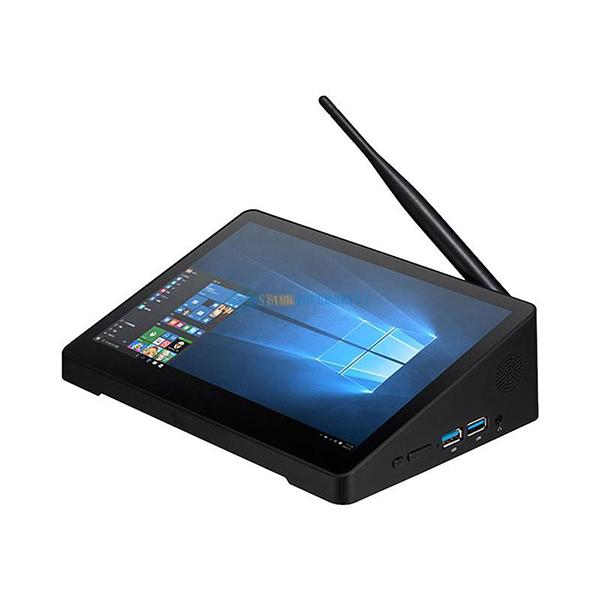
Proper Cleaning and Maintenance Practices
Using Microfiber Cloths for Wiping
Always clean ICC touchscreens with lint-free microfiber cloths to avoid introducing abrasive particles. Dampen the cloth slightly with distilled water or a mild, alcohol-free cleaning solution designed for electronics. Avoid paper towels, rags, or rough fabrics, which can scratch the surface.
A manufacturing plant in Germany reduced touchscreen scratches by 70% after switching to microfiber cloths, eliminating the use of shop towels that had previously caused micro-abrasions over time.
Gentle Circular Motion During Cleaning
Wipe the screen in small, circular motions to distribute pressure evenly and avoid concentrated friction on specific areas. Apply minimal force, as excessive pressure can weaken the protective coating or push debris into the screen’s surface.
An automotive assembly line operator noticed fewer scratches after training staff to use light, circular strokes instead of back-and-forth wiping, which had previously concentrated dirt at the edges of the display.
Avoiding Harsh Chemicals and Solvents
Never use ammonia-based cleaners, acetone, or abrasive compounds on ICC touchscreens. These chemicals can strip anti-reflective coatings or etch the glass surface. Stick to pH-neutral solutions approved for electronic displays.
A food processing facility prevented coating damage by replacing a generic glass cleaner with a specialized formula, preserving the touchscreen’s scratch resistance even after frequent cleaning cycles.
Protective Accessories and Environmental Controls
Installing Screen Protectors Designed for Industrial Use
Apply a high-quality, scratch-resistant screen protector made from tempered glass or polyethylene terephthalate (PET) film. Ensure the protector is compatible with the ICC’s touch technology (e.g., capacitive or resistive) to maintain functionality.
A power plant operator extended touchscreen lifespan by 3 years by installing industrial-grade screen protectors, which absorbed impacts from accidental tool drops and prevented direct contact with abrasive particles.
Using Enclosures with Sealed Bezels
House ICCs in enclosures with raised, sealed bezels to create a barrier between the screen and external contaminants. Choose enclosures rated for dust and water resistance (e.g., IP65 or higher) to minimize exposure to harsh elements.
A mining company reduced screen damage by 65% after upgrading to enclosures with rubberized bezels, which deflected debris and prevented scratches caused by vibrating equipment nearby.
Controlling Humidity and Temperature in Operating Areas
Maintain stable environmental conditions to prevent condensation or thermal expansion, which can weaken screen adhesives or cause micro-cracks. Use dehumidifiers in humid climates and heaters in cold environments to keep temperatures within the manufacturer’s recommended range.
A chemical processing plant avoided screen delamination by installing climate control systems in control rooms, stabilizing humidity levels below 60% and temperatures between 10°C and 30°C.
Operational Habits and User Training
Encouraging Clean Hands Before Touchscreen Use
Train operators to wash or sanitize their hands before interacting with ICC touchscreens to remove oils, dirt, or metal shavings that could scratch the surface. Provide hand sanitizer stations near control panels for convenience.
A semiconductor manufacturer cut scratch incidents by 50% after implementing a “clean hands first” policy, reducing the transfer of abrasive particles from workshop environments to sensitive displays.
Avoiding Sharp Objects Near Touchscreens
Prohibit the use of pens, styluses with hard tips, or tools near ICC touchscreens. Encourage finger-only interaction or provide soft-tipped styluses designed for capacitive screens if precise input is required.
An assembly line supervisor prevented scratches by replacing metal styluses with rubber-tipped alternatives, eliminating accidental gouges caused by operators using pens to navigate menus quickly.
Implementing Scheduled Inspections for Early Damage Detection
Conduct weekly visual inspections of ICC touchscreens to identify minor scratches or cracks before they worsen. Replace screen protectors or displays promptly if damage is detected to prevent further degradation.
A railway signaling operator caught early-stage scratches during routine checks, allowing timely replacement of screen protectors and avoiding costly touchscreen replacements due to deep gouges.
By adopting these measures, organizations can significantly reduce the risk of scratches on industrial control computer touchscreens. Proper cleaning, protective accessories, environmental controls, and user awareness work together to preserve screen integrity and ensure reliable operation in demanding industrial settings.
Our company was founded in 2015 by a group of enthusiastic industrial hardware professionals who share a common passion for Iron Man Tony Stark. With their extensive theoretical knowledge and industry experience, the company was born out of a desire to create a high-tech product company in the computer hardware field, aiming to become the “Iron Man” of the computer industry. We specialize in OEM/ODM services, providing high-quality industrial computer production and research and development. Our product forms include touch display monitors, touch all-in-one machines, ruggedized tablets, various new-generation advertising machines, and specialized computers for harsh environmental applications. Our goal is to help customers achieve business value through innovative and high-quality products.Official website address:https://www.starktouchdevice.com/

